Monday, February 05, 2007

Alarm Clock Tips

I've had several users email me recently with similar stories. They have a laptop, but they keep their giant music collection on an external drive somewhere. The problem is, they like to bring their laptop into their bedroom to use as an alarm clock, but it's a hassle to bring the external drive too. (Very understandable in my opinion...who wouldn't prefer to slowly awake to their favorite tunes over a blaring, annoying alarm clock.)

There's a very elegant solution to this. Starting with iTunes version 7, Apple introduced support for multiple iTunes libraries built right into the application. If you hold down the option key while launching iTunes, you'll be prompted with the following dialog box:


The idea here is to create a seperate iTunes library just for the alarm clock application that only contains songs on the internal hard drive. If we click "Create Library..." we can do just this. Just give the library a name:


Now you've got an empty iTunes library. Just add any songs you want that are on your built-in hard drive.


After you do this, you can quit iTunes, and relaunch holding down the option key. Then pick your original library (most likely in ~/Music/iTunes/) and you're back to your regular iTunes library.

The final step is simply to instruct Alarm Clock to use this new library that you just created. Quit the Alarm Clock application. Open up your terminal. And type in the following command:

defaults write com.digitallity.alarmclock2 'XMLPath' '/Users/robbie/Music/iTunes (AlarmClock)/iTunes Library.xml'

Replacing the last part of the command with the proper path on your machine. For more information about this tip, see my FAQ page, question number 9.

Happy Anniversary

Today was Super Bowl Sunday here in the US. This is the day when all Americans crowd around the TV and watch the championship game of "football." But for me it represents the beginning of the Alarm Clock application.

Last year I was watching the Super Bowl (and browsing the web) when I noticed that my Alarm Clock application was featured on MacBytes.com. At the time I was hosting the application on an old Linux box I had sitting in my apartment. Our Internet connection came to a screeching halt as thousands of people starting downloading the application. I had to scramble to find a web host, and that night robbiehanson.com was born.

It's been around a year since then, and the Alarm Clock application has grown and matured. It has been downloaded around 300,000 times. It's available in 16 different languages. And today it's on the front page of Apple Downloads (#5 in the iPod + iTunes category).

I'd like to thank everyone who has sent me donations, and those who have contributed by providing localizations or sending feedback.

By no means am I done developing this software. I continue to have new ideas on how to improve it, and I continually get feedback and suggestions via email and this blog which helps me improve the application.

Monday, January 29, 2007

Version 2.4.1 released

A while back I mentioned a known bug in Alarm Clock that had been really bothering me. The problem occured when the application attempted to play a song that was protected, and the user wasn't authorized to play it. When this happened, QuickTime would pop up a dialog box prompting the user to authenticate, and the alarm would fail to play. Granted this happens very rarely, and probably only affected a few users, but the fact that it might bother even 1 user is enough to keep me up all night working on it.

Well I'm proud to announce that I found a solution for it, and this is no longer a problem as of version 2.4.1. In fact, I tested this problem on my main 2 competitors' apps, and both of them failed. So it looks like I may be the first alarm clock app to solve this little dilemma.

And while the above paragraph might sound like I'm tooting my own horn, my biggest goal is to improve the overall reliability of software alarm clocks. Not simply mine, but all software alarm clocks, especially on the Mac platform. After all, the reason I made my own alarm clock in the first place is because I wasn't satisfied with the reliability of other products on the market. And I'm guessing that my competitors probably read this blog, so this will help motivate them to solve the problem in their own software, giving all of us (no matter what product we use) a more reliable application.

And the other fix I made is a little embarrassing.
I somehow forgot (or deleted it at the last second) the CFBundleName key in the info.plist file of the application. Generally this isn't a big deal at all, except that the Sparkle (auto update) framework relies on this key to function properly. So the auto update feature in version 2.4 is broken. So users will be notified there's an update, and they'll have a button that says "download and install"...except it won't work! The download will work fine, but it will fail to properly install the application! And so users will be left with a broken application on their computer! Oops! (ouch).

Well I've fixed the problem, but users will have to manually download version 2.4.1 from my website.
When they're notified that there's a new version available, the release notes tell the user that the auto update feature is broken, and it provides the user with a link to directly download the file.

My apologies for this goofup! The auto update feature should work flawlessly in the future.

Sunday, January 28, 2007

Version 2.4 released

I've had a lot of spare time recently to work on the alarm clock. Why have I had so much spare time? Because an ice storm hit the city that I live in and knocked out power for nearly the entire city. My apartment lost power as well, and it took 2 weeks to get it back! I spent those 2 weeks at my parents house, and at my girlfriend's parents house. There wasn't a whole lot to do of course, so I sat around and coded.

During this time I managed to add 2 new features to the alarm clock that I've been wanting to do for a long time, but have been putting off for some reason. The first thing I did was give the application a proper preferences panel. A standard one with buttons at the top, like this:


The second feature (which is a bit obvious from the image above) is automatic software updates. I've been meaning to get around to this for so long, but never got the chance. Well now it's implemented. In the future, when updates are released, users will automatically be notified, and the downloads can be downloaded and installed with a few clicks!

Sunday, November 26, 2006

Speaking of cell phone alarms...

In my last post I talked about the hideous horrible problem with the alarm clock on the motorola razr. But know I'd like to talk about something else regarding cell phone alarms.

My girlfriend uses her cell phone to wake up every morning. Now, I have to go off on a tangent for a second to explain why she uses her cell phone. She doesn't have a Mac, first of all, so she can't use my application. She'll probably get a Mac when she gets a new computer, but she can't exactly afford to buy a computer right now. She has a regular alarm clock by her bed, and she doesn't use it. I asked her why once, and she told that it was too loud first of all. And second of all, the genious manufacturers put the tiny snooze button right next to the tiny stop button, so when she tries to hit snooze in her sleep, she ends up hitting the stop button half the time. Thus she uses her cell phone.

Now every night as we're lying in bed, I sit there and watch her set her alarm. She'll go to the alarm menu, and then she'll find the alarm named 'School'. She looks at it for a second, and then decides that she wants to use this alarm, but she's not sure what time it's set for. So she has to go into it's settings and double-check what time it is. Every night she double-checks it's time, even if she's not changing it from the night before. When I ask her why, she says that she feels more confident if she see's the actual alarm time. If she just sees the word 'School' she doesn't know if it 's set to let her sleep in, or get her up early, etc.

Now for the love of me, I don't know why she even uses a name for her alarms. She could save herself some time every single night, if she would just stop naming her alarms. But the fact that the alarm gives her the option of setting a name is enough to convince her that she should name them ALL...

Now I get a lot of feature requests for Alarm Clock 2. And one of the common requests is to name the alarms. This way when people click on the alarm clock icon, they can see a name for their alarm, and not simply the time. I have not implemented this feature. I hope this gives you an idea of why...

Tuesday, November 14, 2006

Alarm Clock vs Motorola Razr

I had a test this morning, and I needed to study for it. Actually, I needed to study for it really bad, so I had to pull an all nighter. Well, at least I tried to pull an all nighter, but I got really tired at like 4 in the morning. So I decided to take a quick nap. Give myself an hour of sleep to refresh, and then get back to studying. So I set an alarm for 5 AM on my computer and laid down. But while I was laying in bed, I decided that a second alarm would be nice. Configure this second alarm to go off at 5:05 just to annoy me out of bed, because I know I'll jump up and hit snooze on my computer alarm right at 5. A second alarm might force me up sooner. And my motorola razr phone was sitting right next to my bed, so I grabbed it, and quickly programmed an alarm for 5:05 and quickly drifted off to sleep.

5 o'clock comes around, and my computer alarm goes off, slowly ramping the volume for me, and playing some easy jazz music. Off course, I'm still dead tired, so I got up and convinced myself to hit snooze and lay down for just a little bit longer. A couple minutes later, my razr alarm goes off. In the dark I fumble for my phone, and quickly mash the side buttons (on the outside of the phone) with my thumb (in order to hit snooze), and fall back asleep.

Couple minutes later, my computer alarm goes off again. I probably hit snooze a few more times on my computer before I actually got up. But the whole point to this story is that the alarm on my razr never went off again! I hit snooze, and it decided to stop on me! WTF?!?

Now I've been using motorola cell phones for years now, and I've used the alarm feature many times on my last motorola phone. I would trust it just fine. But this is the first time I'd used the alarm feature on my razr. So I found it hard to believe that the software would have such an obvious bug. I wanted to get to the bottom of this, so I started testing the alarm later that day. Everytime I tested it, it worked just fine. When the alarm goes off, I can hit any button on the outside of the phone to put it to sleep, and it will go off again after the snooze duration perfectly. That is, until I discovered the most hideous software engineering mistake of all time:

If you hit a button on the outside of the phone once, it snoozes the alarm. If you again hit another button on the outside of the phone, it turns the alarm off!

So when I had reached for the phone, and quickly pressed an outside button, I had inadvertantly pressed 2 buttons at the same time, and turned the alarm off! Now it's not like I'm a professional basketball player, with giant hands. Anybody who has ever used a razr before will tell you how easy it is to press two buttons on that thing on accident. Even worse, the volume buttons are actually one button, where you have to press one side or the other to turn the volume up or down. But if you press in the middle of this button, you actually press in both buttons. And since this volume button is the biggest button on the outside of the phone, I'm assuming this is what happend.

So apparently motorola expects me to wake up to my phone alarm, and ever so carefully, while still half asleep, in the dark, use my pinky finger to press snooze, and be attentive enough to not press any more buttons after that. Brilliant work Motorola. You suck. Thank goodness for my computer alarm, or I would have failed my test this morning.

PS - I still love my motorola phone, I just won't depend on it's alarm clock. And I was exagerrating when I said it was the biggest software engineering mistake ever. This mistake would have to compete with microsoft for that honor...

Wednesday, November 01, 2006

Version 2.3.8 released

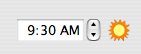
For those people who use a 12 hour clock with AM/PM, it is rather common to set the time and forget to double-check the AM/PM symbol. I'll bet just about everyone has done it once. Well I did it the other day, and I was pissed off. It's pretty easy to do on a normal alarm clock. But I use a $2000 alarm clock, so it should be a little smarter than that. So here's what I came up with:


When the time is between 6AM and 6PM you'll see the sun icon. Because it's generally light during these times. At other times you'll see the moon icon. It makes it a lot harder to screw up a morning alarm. And for those people that use a 24-hour clock, and don't have to deal with these problems, the icon is hidden.

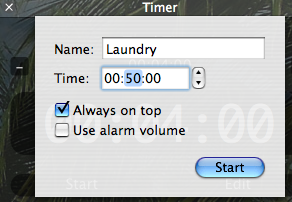
Also, many people have asked that they be able to put timers and stopwatch windows above all other windows. So I've added an "always on top" option. Also, the timer will now include an option that allows one to say, "when this timer goes off, sound the alarm at the same volume that I have configured my normal (non easy wake) alarms to go off". The option is called "Use alarm volume"

Monday, October 23, 2006

New version coming soon

Just wanted to let everyone know that I'm still here, and still working on the alarm clock. With some 75,000 active users, I still get a ton of feedback and feature requests. (Actually I have no idea how many active users the app has, since the only information I have is the number of downloads. But since I have around 200,000 downloads, I figured it might be a decent guess.)

Anyways, I'm implementing a couple new feature requests right now. Some of them are pretty basic, and some of them are really clever. I'm not going to announce the new features until the new version is released, but I thought I'd just let everyone know that I'm still here, and the application is still in active development. In fact, I currently have a huge ToDo list for the application, and I'm looking forward to implementing some of the bigger items.

Friday, October 06, 2006

Update QuickTime...now

When iTunes 7 first came out, I was pretty excited like most Mac users and immediately downloaded and installed it. It worked fine, but I had a weird problem in the Alarm Clock application. I tried to play a song I had purchased from the iTunes Music Store, and I got an error dialog saying that my computer was not authorized to play this song, and that I needed to authorize my machine from within iTunes. This is a problem within itself. But when I opened up iTunes and tried playing the same protected song, it worked fine. So I tried playing the song from that QuickTime application, and I got the same dialog message. This time I clicked OK, and it brought me into iTunes and prompted me to authorize my machine by signing into my account. I signed in and my machine count went up by one, but I STILL couldn't play any of my protected music outside iTunes!

I was a little freaked out by this, and immediately sent a bug report to apple. I was expecting to recieve hundreds of complaints via email from users... but I didn't. Then a few days later I was notified that a software update was ready for me. It was a QuickTime update that had been available for weeks, and I had just ignored it before. I installed the update, and everything works fine now. So if you have installed the new iTunes 7, but don't have QuickTime 7.1.3, please update immediately!

I sincerely hope this problem didn't affect anyone but me. But in case it did, my apologies. However, the problem isn't fully solved yet. As somebody pointed out to me before all this occured, the same thing will happen if you're not authorized to play a song, and you try to play it in Alarm Clock. In other words, you got a protected song from somebody else, that they bought from the iTunes Music Store, but you're not currently authorized to play it. I'm currently looking for a work-a-round for this problem, but I haven't found one yet. The problem seems to be that there is no way to check to see if a machine is authorized to play a song BEFORE you try to play it. But this seems ridiculously silly. Surely apple wouldn't do something so stupid... would they? If anyone knows of a way to do this, I'd love to hear from you

Thursday, August 24, 2006

Upcoming feature requests

I've been asking a lot of people lately whether or not they like the colored icons in the system menu bar. The results have been about 50/50. Half of the people like them, and half would prefer black & white, to match the standard apple scheme. In fact, I even did a poll on MacUpdate, and the results (at the time of this writing) are exactly 50/50. Because of this, I'm offering a new option, in the app's preferences, of the next version to use colored or black & white icons.

Another thing that many people have been asking for, is for me to disable the 'kill alarm' feature. I realize that many people like to continue listening to music after they get up, and as they get ready to leave in the morning. However... the kill alarm feature is a safety feature for those times when you forget to disable an alarm, and it goes off in the morning and you're not there. Even those people who like to listen to music in the morning will need this safety net occasionally. To compromise, I'm allowing the kill alarm duration to be turned all the way up to 90 minutes in the next version. I'm hoping this will be plenty of time to get up and get ready in the morning. If anyone is listening to music for hours on end after they get up, they should probably be listening to iTunes anyway.

I also plan on adding title's to stopwatch windows.

And I've been contacted by people who are working on a Norwegian and Japanese localization. Haven't heard from them in a few days, but I'm hoping to still have these localizations soon.

And one more thing:
The other morning, my alarm went off, and I decided I wanted to sleep in for another hour or so. Not exactly a normal snooze duration, but I proceeded to hit the plus button (to increase the snooze duration) 50 times before I got it to where I wanted it. When I layed back down, I thought to myself - that was overly difficult. So in the next version I'm going to add support for a key modifier. If you hold down option and press the plus/minus buttons it will increase/decrease your snooze duration in increments of 5 minutes.

Let me know what you think. You can post comments to this blog even if you don't have a blogger account.

Friday, August 04, 2006

So many distractions...

I've just released version 2.3.4 of the alarm clock. It's been a while since I've had a lot of time to work on the application, and I apologize for not getting this release out earlier. I've had a lot of distractions lately. The main distraction is the new software project I'm working on. If you like my alarm clock, you're probably going to LOVE this new one.

Saturday, July 15, 2006

Russian Localization

I've just received a Russian localization for the alarm clock! This means that the free alarm clock application for Mac OS X will soon be available in 14 languages! Here's the list (in no particular order):

English
Traditional Chinese
French
German
Bulgarian
Danish
Spanish
Dutch
Italian
Hebrew
Portuguese
Polish
Finnish
Russian (coming soon)

Don't see your language on the list and would like to have it added? Drop me an email (robbiehanson15@gmail.com) and I'll tell you how you can localize the app. It's pretty easy!

Version 2.3.3 released

Version 2.3.3 was recently released. This version adds the Polish and Finnish localizations mentioned earlier. It also has the following fixes and additions:

1. There was previously a problem with disabled alarms becoming out of order in the menu. What would happen is that when an alarm became enabled, it's internal time wasn't being properly updated, and thus it would float to the top of the menu and stay there. Also, disabled one-time alarms wouldn't be deleted until they were enabled. All this should be fixed. It wouldn't have caused any problems with alarms, but it was an annoyance.

2. The alarm window (as you know) switches between the song information and the keyboard information every 10 seconds (similar to iTunes). But I noticed that iTunes resets the display automatically when a new song starts. Well the alarm window wasn't doing this, so I implemented this funtionality. When a new song starts (and you're using a playlist) the alarm window automatically switches back to displaying the song information.

3. I recently had an annoyance with the application that I decided I needed to fix straight away. I had my alarm set with easy wake recently. The alarm went off, and gradually increased the volume until it woke me up. I got up, hit snooze and went back to bed. But then, about a minute later, I received mail and the mail app loudly played my "You've got Mail" sound, which woke me up because the volume was still at the same level as when I hit snooze on the alarm clock. So now, if you're using easy wake, after you hit snooze, the system volume is immediately reset to your starting volume so that random computer noises don't disturb your snooze time.

I often wonder if my competitors are reading this blog...

If so, this is to one of my competitors:
Check out line 90 of MyPMSetter.m - I think you might be missing a corresponding AuthorizationFree call.

Tuesday, July 11, 2006

Polish, Finnish Localizations

I return from vacation and what do I find in my inbox? Two emails from kind souls willing to help with localizations! The Polish localization is complete, and the Finnish one is in progress, and quickly nearing completion!

Friday, June 23, 2006

Vacation

I'll be on vacation in northern Minnesota for the next week. I'll still be coding, but won't have constant access to the internet. So if you email me, or post comments to this blog, I might not be able to immediately respond. Please be patient and I'll do my best to reply to everyone as soon as I can.

Friday, June 16, 2006

Frequent Feature Requests

There are a few feature requests that I often receive, and I find myself always copying and pasting my previous responses. So I figured I would just post them here for everyone to see.

1. Why can't we name alarms, and have the names appear in the menu?

The idea here is to have the NAME of the alarm show up in the menu, as opposed to the time and date(s).
Thus the menu would show, for example, "Sunday Morning Service" instead of "08:00 AM (Sun)".

This was actually part of the original prototype, but was scrapped after version 1.0 based on user feedback. Most users who set alarms, found that if they saw the name of the alarm in the menu, it wasn't satisfying enough. They constantly found themselves clicking on the name to double-check the time before they went to bed. Seeing "Work" just wasn't as gratifying as seeing "7:00 AM"

It also caused major headaches when users needed to occasionally change the alarm. Maybe some days they would want to get to work a little early, so they'd change the alarm time to 6:30. But the next night, they'll glance at the word "Work" and assume it meant 7:00. It's a lot worse if they decided to sleep in a little bit one day! The same applies for pretty much any repeating alarm. People tweak their alarm times all the time. Perhaps somebody wants to go to the early church service one sunday, and the later service the following week. It's much easier just to glance at the alarm time.

After months of using the product, and much user feedback, I ultimately scrapped this ability. Many users may think it would be cool to have this feature, but after using it for a few weeks I'm confident they'd change their minds on the subject.

I could also try to put both the time AND the name in the menu.
Of course this would result in a HUGE menu, that could possibly stretch across the entire screen, and this would just look silly.

2. Why can't we add messages to alarms, so we can use it for reminders?

The reason I haven't implemented something like that is because I don't want people to think of it as a calendar application. I have no intention of competing with iCal, nor do I think that I could. iCal is perfect for setting up reminders for conference calls, important meetings, deadlines, and managing a to-do list. I feel that people should use iCal for such tasks, as it truly was designed for it, and does an excellent job.

It would be an easy addition to attach text, or a full message, to any alarm. In fact, I could do it by adding another tab at the top of the alarm editor. So there would be "Time", "Alarm" and "Message". Then when the alarm goes off, hitting Stop would bring up the message. I could even program an option where the message is read aloud to you, using Apple's speech API.

But I see a problem with this. The application was made for one purpose, and one purpose only. To be an alarm clock. When people use alarm clocks, they use them to wake up in the morning. Then after they've woken up, they check their calendar to see what they have to do today. My application isn't this calendar. That's what iCal is for. Perhaps they have some other reminder for themselves. Like "don't forget to do such-and-such before leaving for work". And what do people usually use to remind themselves of such little things? Post-it notes! And the computer equivalent would of course be the Stickies program. Many people use repeating alarms. So setting these little reminders for themselves doesn't make sense in the alarm clock. You'd have to go in and set it the night before, and then go in again and delete it the next day. I guess I could make a "One-time" note feature, but I just think it's easier to make a sticky note. Besides, sticky notes don't go away until you want them to. The alarm message would go after stopping the alarm. I just don't see any reason to reinvent the wheel, especially since my wheel wouldn't be as good as the one's that are already out there. And it also makes a simple, elegant application a little less simple, and a little less elegant.


As always, I'm open for criticism. If you disagree with me on any of these points, feel free to let me know. Or if you have a different idea, different view, etc.

Version 2.3.2

I've recently released version 2.3.2. This version includes the previously mentioned Portuguese localization. It also includes a new dmg background image, courtesy of Chike Orjih! I think it looks great!

The main feature addition of this version is the addition of AppleScript support. This has been on my todo list for a long time, and I apologize for just now getting around to it. It was added at the request of 3rd party remote control users, and salling clicker users. You too can now hit snooze without getting out of bed! Just use the following line of AppleScript:
tell app "Alarm Clock" to snooze

I may be adding more applescript support in the future. If you're a scripter, tell me what you'd like to have added.

Friday, June 02, 2006

Portuguese Localization

I've just received a portuguese localization for the alarm clock! This makes 11 supported languages!

I'm always looking for more localizations! Is anyone out there interested in doing a Japanese translation? My website gets a lot of hits from Japan on a daily basis, and I still don't have a Japanese localization... If you're interested, email me at: robbiehanson15@gmail.com

Version 2.3.1

I've recently released a minor update for version 2.3. The big news in this update is that the alarm window displays the current song information. When an alarm goes off, it alternates back and forth between displaying keyboard information (such as "Press any key to snooze, Press enter to stop") and song information (such as "Banana Pancakes, Jack Johnson") It switches back and forth every 10 seconds just like iTunes, and also like iTunes, you can click the text to manually switch between the two whenever you want. So if you've ever woken up to a random song in a playlist that you didn't know what it was, no longer will you be frustrated all morning trying to figure it out.

Also, a while back I added functionality to the apple remote. Users with an apple remote can go to the next and previous songs in a playlist. Well I figured that remote users shouldn't get to have all the fun, so I also implemented this functionality right in the alarm window. When using a playlist, there are now "<" and ">" buttons which will go to the previous and next songs respectively.

I also added icons to the playlist menu. So at a glance you can tell which playlists are smart playlists, or folders, or regular playlists, etc. I also sort the playlist menu just like iTunes does, so smart playlists will always be above regular playlists, and such. This makes it much easier to find the playlist you're looking for. This feature, like the one above it, were planned for version 2.3, but I got so excited after I finished the timer and stopwatch, I decided to release early.

And of course there are some bug fixes. All of them had to do with the timer and the stopwatch. No bug fixes for any part of the alarm system because... well... I haven't had any bug reports in a long time! :)

In version 2.3, timer window location and window size are saved, and restored when you open a new timer window. (Same for stopwatch) The big problem that I had to fix was that it didn't check to make sure the position was actually on the screen! So if you sometimes use multiple monitors, and then switch to just one, and your last timer location was on your secondary monitor, then the window would be offscreen with no way to move it! Oops! Thanks to Luke for alerting me to the problem. It should now be resolved. Hopefully this didn't affect you. If it did, my apologies.

Tuesday, May 23, 2006

Version 2.3

Version 2.3 was recently released.
The response thus far has been phenomenal! One of the biggest requests was for the addition of a timer. I've added this functionality, and I believe I've done it in style. If you don't have it yet, you should download it now.

You can also check out the screenshots of the new features here:
http://www.robbiehanson.com/alarmclock/screenShots.html